Intellivision controller to USB adapter project
Project overview
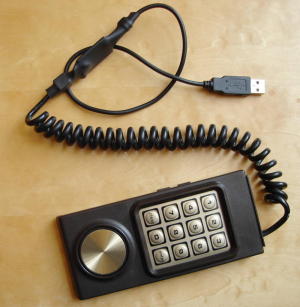 Someone requested that I convert an Intellivision 1 controller to USB. The result
can be seen on the picture on the left. As usual, everything is open-source so you'll
find schematics and source code on this page.
Someone requested that I convert an Intellivision 1 controller to USB. The result
can be seen on the picture on the left. As usual, everything is open-source so you'll
find schematics and source code on this page.A fun part of this project is the fact that I've had no choice but to figure out how the controller worked by myself. I did some research, but could not find any pertinent information about how it worked. But fear not! I have taken the time to create an how it works section to detail my findings.
The key features of the result are:
- All 16 directions (+ Idle position) of the disc are functional
- All "Telephone" style buttons are usable
- All 4 side buttons are usable (Top left and Top right are equivalents though)
- No custom drivers required. Device is standard USB Hid (Human Input Device)
Schematic
Here is the schematic: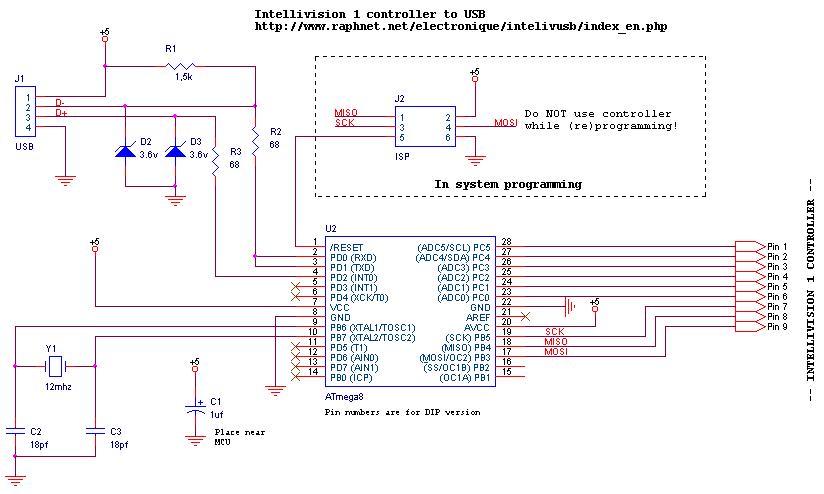
A table matching pin numbers to wire colors is given in the how it works section.
Important:
Keep in mind that the pin numbers are for Intellivision 1 controllers only! At the moment, I have no idea what the pinout for other similar controllers would be.
If you wish to try a different controller, I suggest that you use the information in the how it works section and compare with your controller. Be sure to contact me with your results!
Component list:
| Ref | Description |
|---|---|
| U2 | Atmega8 microcontroller. ATMEGA8-16PC, ATMEGA8-16PI, ATMEGA8-16PJ or ATMEGA8-16PU. Dont use an ATMEGA8L-*, the 12Mhz clock would be too high. |
| R1 | 1.5k resistor. Ordinary carbon film 1/4 watt resistors will do. |
| R2, R3 | 68 ohm resistors. Ordinary carbon film 1/4 watt resistors will do. |
| D2, D3 | 3.6 volts zener diodes. |
| Y1 | 12 Mhz crystal. |
| C2, C3 | 18 pf capacitors. If the crystal datasheet recommends another value, use it instead. |
| C1 | 1uf capacitor. Install it near the ATmega8 power pins. |
| J2 | 6 pin header, 2.54mm spacing. Needed for programming the ATmega8. |
For the USB connection, just strip the USB cable and solder the wires directly to the board. USB uses standard wire colors:
| Color | Description | ||||||||||||
|---|---|---|---|---|---|---|---|---|---|---|---|---|---|
| Red | +5 volts | ||||||||||||
| Black | Ground | ||||||||||||
| Green | D+ | ||||||||||||
| White | D- |
Firmware
A microcontroller is a component which must be programmed in order to do something useful. The .hex files you must use are provided in the table below. (Note: The files ending by .m168.hex are meant to be used with Atmega168 chips. Others are to use with Atmega8).The source code is released under the GPL license and compiles with avr-gcc. To prevent conflicts, please do not distribute modified version where the USB report descriptor has been modified without replacing the USB Vendor ID and Product ID by yours.
| Version 1.3 October 7, 2016 (Friday) |
|---|
|
| File(s): intellivusb-1.3.tar.gz (68.7 KB) intellivusb-1.3.hex (8.6 KB) intellivusb-1.3.m168.hex (8.9 KB) |
Show previous releases...
| Version 1.2 September 16, 2016 (Friday) |
|---|
| Add support for Atmega168 |
| File(s): intellivusb-1.2.tar.gz (68.6 KB) intellivusb-1.2.hex (8.1 KB) intellivusb-1.2.m168.hex (8.4 KB) |
| Version 1.1 February 11, 2016 (Thursday) |
|---|
| Maintenance release: Fix compilation with modern gcc-avr toolchains |
| File(s): intellivusb-1.1.tar.gz (67.3 KB) intellivusb-1.1.hex (8.2 KB) |
| Version 1.0 March 1, 2008 (Saturday) |
|---|
| Initial release |
| File(s): intellivusb-1.0.tar.gz (72.8 KB) intellivusb-1.0.hex (8.7 KB) |
 This project is also available on GitHub!
To request features, report issues or contribute, you may send me an email or use the GitHub repository:
https://github.com/raphnet/intellivusb
Many microcontrollers have what is called 'Fuse bytes'. Those are values used to configure some aspects of the microcontroller. (eg: What type of clock to use? Crystal? Resonator? Internal RC clock? Allow programming via ISP?)
It's essential to set the fuses to the correct values. Using the wrong values can render your MCU unusable.
For this project, here are the appropriate fuse values:
- For Atmega8: High byte = 0xc9, low byte = 0x9f
- For Atmega168: High byte = 0xd5, low byte = 0xd7, extended byte = 0x01
For details about how to program an AVR, visit my AVR programming page.
 Pre-programmed Atmega8 (DIP package) available
PCB for surface-mount
The surface-mount version uses my Multiuse PCB2 circuit. Here's what it looks like:
Multiuse PCB2: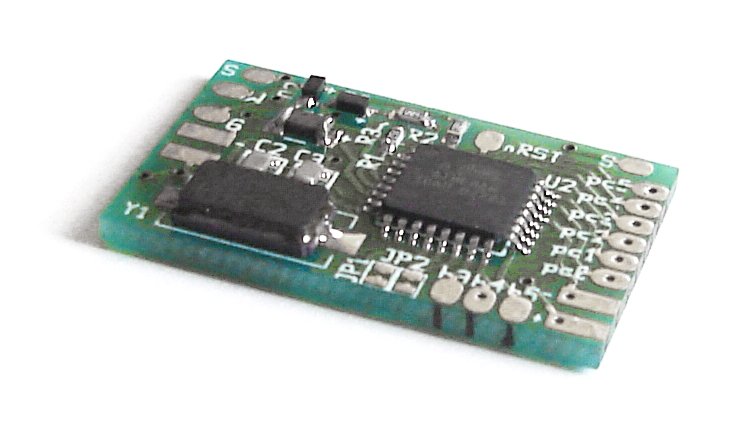
|
Intellivision 1 Wiring: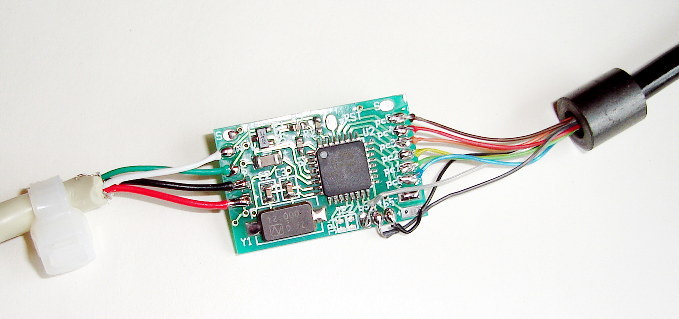
|
How it works
I tried to find information about the controller on the net before beginning this project but I could not find anything useful. So I had no other choice than to figure out how the controller worked by myself, which was quite fun. Here's how it works (at least to my understanding).The controller has 12 buttons organized in a way similar to a telephone keypad, 4 buttons on the sides (The top buttons on each side perform the same function), and a rotating disc. The rotating disc and the 12 'telephone' buttons cannot be used at the same time.
The controller I used (Intellivision 1) had 9 wires and a connector meant to be connected directly to the console's main board. Here's the wire number/color relation table:
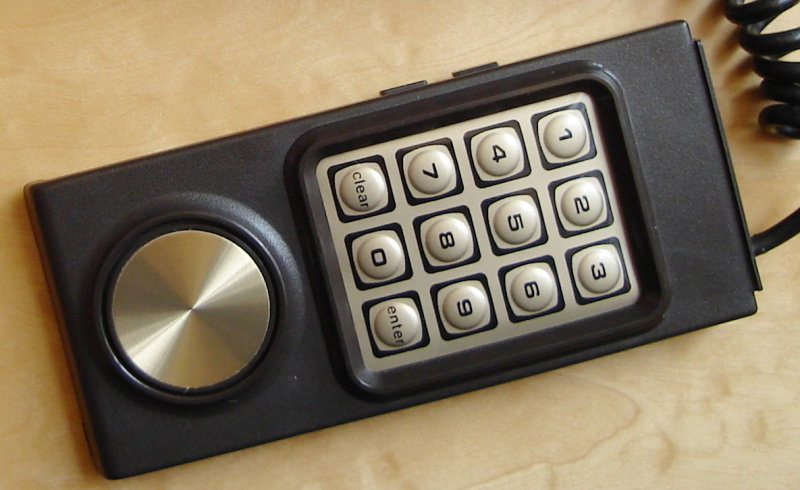
Intellivision 1
| # | Color |
|---|---|
| 1 | Brown |
| 2 | Red |
| 3 | Orange |
| 4 | Yellow |
| 5 | Green |
| 6 | Blue |
| 7 | Purple |
| 8 | Dark grey |
| 9 | Light Grey |
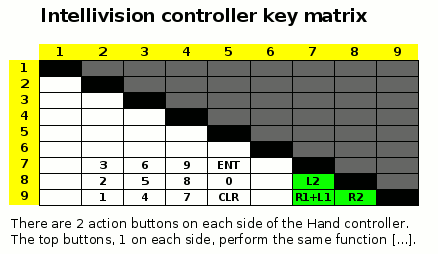
Considering that only 9 wires are used without electronic components inside the controller, it is obvious that the buttons are organized as a matrix. This means that they must be scanned in software. Here's a table I built showing which wires are used:
The disc is capable of 16 different directions. The current direction is output using 6 wires (#2 to #6, #1 as common). As you can see, these are in conflict with the 'telephone' buttons. This is why the 'telephone' buttons and rotating disc are not usable together. Notice also that there is always only 1 bit of difference between adjacent directions. Does it remind you of Grey code?
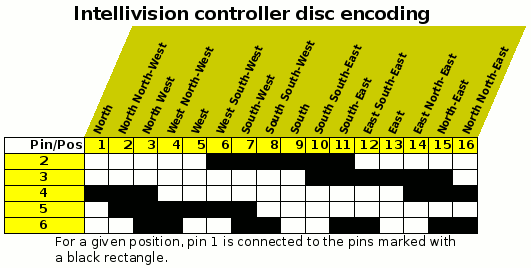
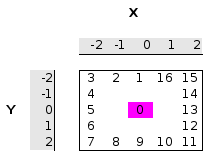
The middle direction is encoded simply by leaving wires #2 to #6 not connected with #1.
Use
The adapter implements a standard HID joystick. The buttons are assigned as follows:| Controller button | USB button |
|---|---|
| Top Action | 1 |
| Bottom Left Action | 2 |
| Buttom Right Action | 3 |
| Keypad 1 | 4 |
| Keypad 2 | 5 |
| Keypad 3 | 6 |
| Keypad 4 | 7 |
| Keypad 5 | 8 |
| Keypad 6 | 9 |
| Keypad 7 | 10 |
| Keypad 8 | 11 |
| Keypad 9 | 12 |
| Keypad CLEAR | 13 |
| Keypad 0 | 14 |
| Keypad ENTER | 15 |
| Keypad 4 + CLEAR | 17 |
| Keypad 5 + 0 | 18 |
| Keypad 6 + Enter | 19 |
| Keypad 2 + 9 | 20 |
| Keypad 2 + 7 | 21 |
| Keypad 0 + 4 | 22 |
| Keypad 0 + 6 | 23 |
| Keypad 4 + ENTER | 24 |
Note: USB Buttons 17 to 24 are only available since version 1.3.
Here are a few screenshots of the adapter used with emulators:

OpenEMU
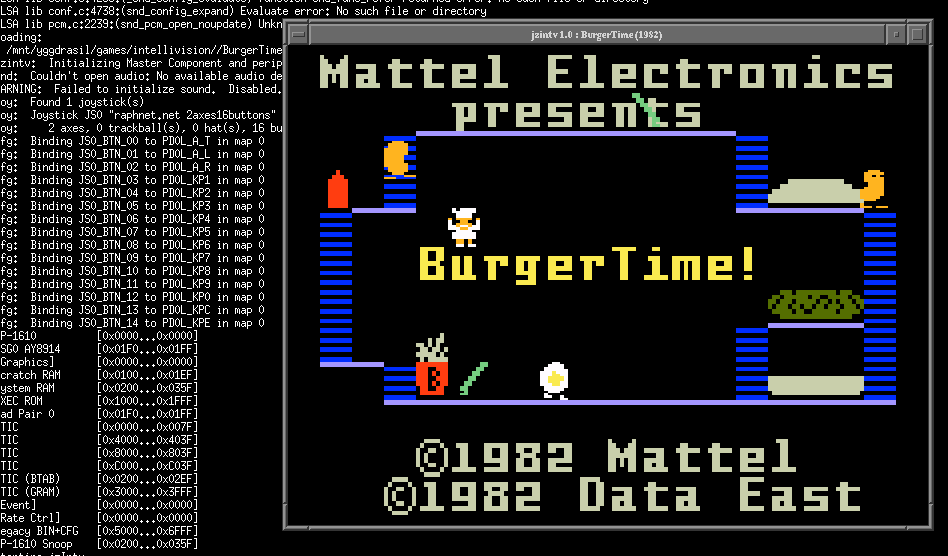
jzintv-1.0 beta 4 (Linux)
For jzintv, here is a kbdhackfile which maps the joystick buttons properly. Specifiy it using the --kbdhackfile argument.
- Adapter version 1.3 and newer: hackfile.txt (4 + Clear: Pause, 5 + 0: Reset, 6 + Enter: Quitter)
- Adapter version 1.2 and older: raphnet.map
jzintv-1.0-beta4-kbdhack-patch.diff
(Note: The issue is solved in the Current Stable Dev Version)
Disclaimer
I cannot be held responsible for any damages that could occur to you or your equipment while following the procedures present on this page. Also, I GIVE ABSOLUTELY NO WARRANTY on the correctness and usability of the informations on this page. Please note, however, that the procedures above have worked in my case without any damages or problems.Now you cannot say that I did not warn you :)