AdLib sound card on a parallel port
Why?

AdLib sound cards have a unique sound (listen to samples) which reminds me of the time where I got my first sound card :)
Nowdays, most motherboards do not have no ISA slots, so you cannot use an AdLib card with them. It's also not possible to use an AdLib card on computers which are not PC compatible, such as Macs and Sun Sparc workstation. Laptops are out of question too.
However, we can still listen to AdLib music by emulating the card. There is an open source AdLib emulator called AdPlug. AdPlug is available on sourceforge: http://adplug.sourceforge.net/ and works as a unix command line player, xmms or winamp plugin, or under dos.
Even though emulation is possible, I was sad to keep my good old AdLib card collecting dust in a closet. At some point in 2005, I got the idea of making a parallel port interface for it. Then in order to play to adlib music files, I modified adplug so that the real card would be used to produce sound instead of emulation. So I could play back files in any format supported by adplug on my (then modern) Sun Sparc and amd64 workstations :)
An update in 2019!
Since I finished this project in 2005, someone had the excellent idea of designing a small PCB with an OPL2 chip and support components (clock, DAC, amps...) which connects directly to a parallel port. This wonderful project is known as opl2lpt.
At the time I built my interface, I had only used my project with AdPlug. But the creator of opl2lpt did better: The opl2lpt can be used with original DOS games thanks to a driver and a tool to patch games.
Moreover, since the coming of opl2lpt, a few new DOS games even support it natively.
I don't know if it is a coincidence, but it happens that the way the OPL2 chip is wired in the opl2lpt project is equivalent to what I did for my parallel port to AdLib ISA card interface! What works with the opl2lpt therefore also works with my project.
When I became aware of the above, I took the project out of its box and started enjoying it in a new way!
Pictures from 2019
This laptop form the Windows ME era now runs DOS 6.22. Unfortunately, the built-in sound card refuses to work. But the system is no longer silent! Thanks to the adlipt TSR driver from the opl2lpt project, the games and software are made to believe than an AdLib card is present.Here is the interface connected to the laptop:


Running a few tests with AdLib Jukebox...:
Quelques tests rapides avec AdLib Jukebox:

In action with AdLib Jukebox

In action with AdLib Jukebox

In action with AdLib Jukebox

adlipt
Pictures from 2005
First of all, here is an overview of the assembled project:
I decided to use an ISA backplane instead of soldering directly on the card connector contacts. I have used the power supply from an old VCR power supply (A PC power supply would be fine too). The VCR power supply had a 5 volts output, but did not have +12 and -12 Volts outputs. Fortunately, it had other outputs which I converted to +12 and -12 volts using regulators. (lm7812 for +12 and lm7912 for -12).
The ISA bus provides a 14.318Mhz clock and the adlib card uses it. I built a crystal oscillator to generate this frequency. I took the crystal on an old motherboard (I guess it's purpose was to generate the very same signal!).
Here are other views of the project:


Schematics
Here is the main schematic: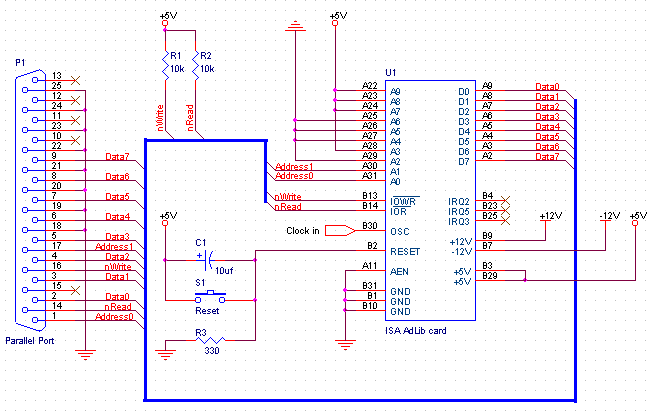
And here is the crystal oscillator schematic:
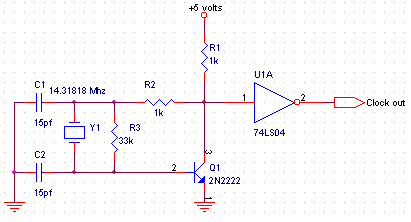
This was the first time I built a crystal oscillator. I know there are simpler circuits without a transistor and with only one inverter gate, but I was not able to make it work. I think it would have been easier with 74hct family instead of 74ls family. Feel free to build it differently.
Explaination
First of all, I closely looked at the card to find out which ISA signals were used. The following tables lists all the used signals, where I connected them and what they are for:| # ISA signal | Name | Connects to | Direction | Use |
|---|---|---|---|---|
| A2 | D7 | Parallel port 9 (Data 7) | Bi-directional | Data bit 7 |
| A3 | D6 | Parallel port 8 (Data 6) | Bi-directional | Data bit 6 |
| ...And so on... | ||||
| A9 | D0 | Parallel port 2 (Data 0) | Bi-directional | Data bit 0 |
| A11 | AEN | 0 volts | To the card | Address validation, used for DMA. The adlib card will ignore read and writes if this signal is high. |
| A22, A23, A24 et A28 | A9,A8,A7,A3 | 5 Volts | To the card | Address bits 9,8,7 and 3 (See note 1) |
| A25, A26, A27 et A29 | A6,A5,A4,A2 | 0 Volts | To the card | Address bits 6,5,4 and 2 (See note 1) |
| A30 | A1 | Parallel port 17 (Select) | To the card | Address bit 1 (See note 2) |
| A31 | A0 | Parallel port 1(Strobe) | To the card | Address bit 0 (See note 1) |
| B1,B10,B31 | Ground | 0 Volts | Power | 0 Volts |
| B3,B29 | +5Vdc | 5 Volts | Power | 5 volts |
| B7 | -12Vdc | -12 Volts | Power | -12 volts |
| B9 | +12Vdc | 12 Volts | Power | 12 volts |
| B30 | OSC | Oscillator output | To the card | 14,31818 Mhz clock |
| B13 | /IOW | Parallel port 16 (Init) | To the card | When low, the data byte present on the BUS is written to the card handling the current address on the BUS. |
| B14 | /IOR | Port parallèle 14 (Autofeed) | To the card | When low, the card handling the current address on the BUS writes the byte on the data BUS. |
http://pinouts.ru/data/ISA_pinout.shtml
Card addressing:.
This AdLib card uses the address 0x388 and 0x389. Those two addresses differ by only one bit, as shown in the following table:
| 3 | 8 | 8 | |||||||
|---|---|---|---|---|---|---|---|---|---|
| 1 | 1 | 1 | 0 | 0 | 0 | 1 | 0 | 0 | 0 |
| Bit 9 | Bit 8 | Bit 7 | Bit 6 | Bit 5 | Bit 4 | Bit 3 | Bit 2 | Bit 1 | Bit 0 |
| 3 | 8 | 9 | |||||||
| 1 | 1 | 1 | 0 | 0 | 0 | 1 | 0 | 0 | 1 |
| Bit 9 | Bit 8 | Bit 7 | Bit 6 | Bit 5 | Bit 4 | Bit 3 | Bit 2 | Bit 1 | Bit 0 |
This explains why address bit #0 is connected to an output pin on the parallel port.
Note 2: Since there still was an output pin available on the parallel port, I decided to connect it to address bit #1. This will allow me to use a card with 4 consecutive ports in the future.
Software
I wrote a C++ class which can be used with adplug to play back adlib music files with this setup.To test, I wrote a simple command line music player based on adplug and my c++ class.
Someday I may decide to make a more complex version (xmms plugin?) or I might try to submit my class to the AdPlug maintainers. Meanwhile, here are the sources:
paradlib.tar.gz
Samples
Here are a few tunes played back on my AdLib card, in ogg and original formats:| .ogg file | Original file | Description |
|---|---|---|
| adlibsp.ogg | adlibsp.s3m | StarPort BBS intro tune, by Purple Motion |
| monkey1_theme.ogg | mi1_theme.laa | Monkey Island 1 Theme |
| monkey2_theme.ogg | mi2_monkey_island_2_introduction.laa | Monkey Island 2 Theme |
| madness-chipmunks.ogg | madness-chipmunks.amd | I dont know where this tune comes from, but I like it. |
Links
Music:http://chiptunes.back2roots.org/ A huge archive of game music in various AdLib formats.
http://adlib.superfighter.com/ RAW music captures of many good games.
Other:
http://www.iki.fi/jrop/specials/digisnap/ Electronic project to capture the sound coming out from the OPL2 digitally for best quality.
http://www.oplx.com/opl2.htm Programming information for the OPL2 chip.
Disclaimer
I cannot be held responsible for any damages that could occur to you or your equipment while following the procedures present on this page. Also, I GIVE ABSOLUTELY NO WARRANTY on the correctness and usability of the informations on this page. Please note, however, that the procedures above have worked in my case without any damages or problems.Now you cannot say that I did not warn you :)